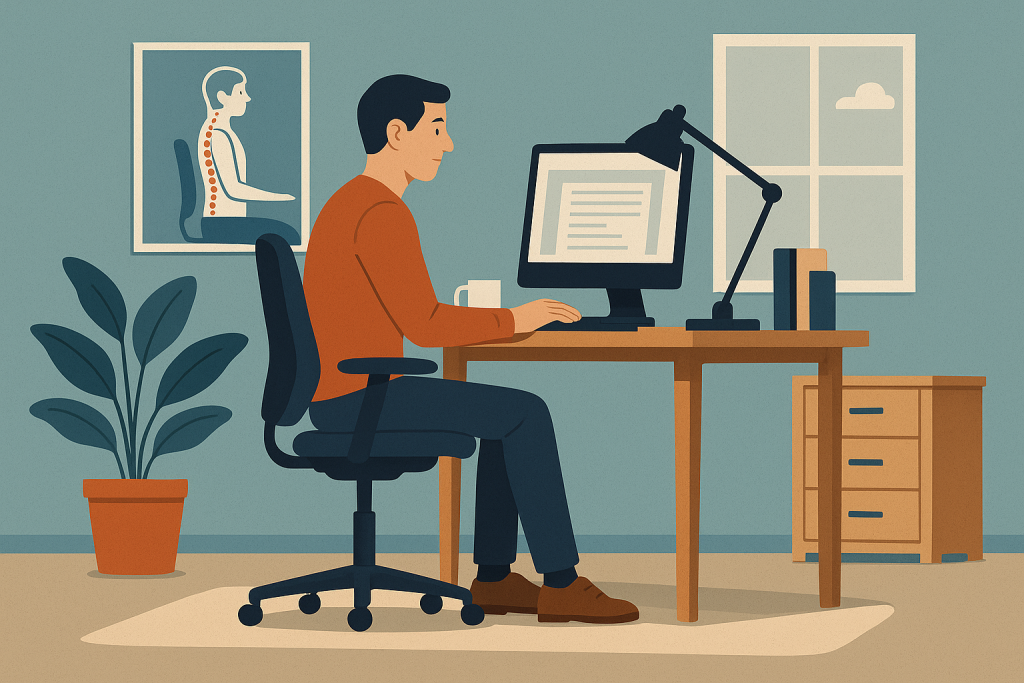
Remote work has become a long-term reality for millions of people, and this shift has highlighted the importance of ergonomics more than ever. Many individuals now spend eight or more hours working from home, often at makeshift setups that aren’t designed for comfort or long-term health. Selecting home office furniture that supports better posture is essential not only for preventing pain but also for improving concentration, productivity, and overall well-being. When furniture aligns with the body’s natural structure, it reduces strain and encourages healthier movement patterns throughout the day.
Creating a supportive workspace doesn’t require a full renovation. Small, intentional furniture choices can dramatically improve posture and transform the home office environment.
Why Posture Matters for At-Home Work
Posture plays a direct role in physical comfort, mental focus, and long-term musculoskeletal health. When posture is poor, several issues often arise:
- Neck stiffness and shoulder tension
- Lower back pain
- Reduced range of motion
- Fatigue and decreased productivity
- Headaches caused by muscle strain
- Wrist and hand discomfort
The National Institutes of Health notes that prolonged sitting in unsupported positions increases the risk of chronic pain conditions and joint stress (NIH, 2024). This makes the selection of home office furniture that supports better posture not only practical but vital for long-term health, especially for those who work from home full-time.
1. Ergonomic Office Chairs Designed for Long-Term Comfort
The ergonomic chair is often considered the centerpiece of a healthy workstation. Unlike traditional dining chairs or soft seating, ergonomic chairs provide structured support that aligns the spine, hips, and neck.
Key features of posture-supportive chairs include:
- Adjustable lumbar support that matches the spine’s natural curve
- Height adjustment to ensure feet rest flat on the floor
- Armrests that support relaxed shoulders
- Seat depth adjustment to maintain hip and knee alignment
- Breathable mesh or flexible back support
The most effective ergonomic chairs maintain neutral posture, meaning the spine is supported without forcing the user into rigid positions. This balance of structure and flexibility helps reduce discomfort over long work sessions.
2. Sit-Stand Desks That Encourage Movement
Sit-stand desks have gained popularity because they support posture by enabling users to shift positions throughout the day. Remaining seated for long periods compresses the spine and tightens hip flexors, while standing intermittently encourages circulation and better alignment.
Benefits of sit-stand desks include:
- Reduced lower back pressure
- Improved energy and productivity
- Encouragement of natural posture change
- Better weight distribution through the legs and core
Electric sit-stand desks offer the greatest convenience, but even manual converters placed on top of existing desks can provide meaningful improvements. The key is alternating between sitting and standing to avoid staying in one static position.
3. Adjustable Monitor Stands to Reduce Neck and Eye Strain
Monitor height is one of the most overlooked components of posture. When the screen is positioned too low, users tilt their neck downward, which increases strain on the cervical spine. A monitor placed at eye level encourages a neutral head position.
Proper monitor positioning supports posture by:
- Reducing forward head posture
- Preventing rounded shoulders
- Decreasing eye strain from upward or downward viewing angles
- Helping maintain an upright, open chest position
Monitor arms with full adjustability make it easy to reposition the screen depending on sitting or standing height.
4. Footrests That Improve Lower Body Alignment
Even small accessories can play a major role in improving posture. A footrest helps keep the legs at a 90-degree angle, supporting lower back alignment and reducing pressure on the knees.
Footrests are especially useful for:
- Preventing dangling feet, which stresses the lower back
- Supporting circulation by reducing leg compression
- Encouraging upright sitting by stabilizing the lower body
People with shorter legs or high desks often benefit the most from adding a supportive footrest to their setup.
5. Adjustable Desks and Worktops for Optimal Arm Positioning
Desk height influences how arms, wrists, and shoulders align during typing or writing. When a desk is too high, shoulder tension increases; when too low, users hunch forward.
Desks that improve posture typically offer:
- Height adjustability
- Space for proper keyboard placement
- Sufficient depth for monitor distance
- Smooth edges to prevent wrist compression
Desks designed with ergonomics in mind allow the forearms to remain parallel to the floor while keeping shoulders relaxed.
6. Lumbar Cushions for Added Lower Back Support
Not everyone wants or needs a full ergonomic chair. Lumbar cushions offer a flexible and affordable way to upgrade support in almost any seat. These cushions restore the natural S-curve of the spine, preventing slouching.
Lumbar cushions provide:
- Better lower back alignment
- Reduced compression in the lumbar spine
- Added comfort for long sitting periods
- Support for users working with non-office chairs
They are a simple solution for renters, travelers, or remote workers who need portability.
7. Ergonomic Keyboards and Mice to Reduce Wrist and Shoulder Strain
Posture isn’t just about the back and neck. Hands and wrists also require support to prevent strain injuries. Ergonomic keyboards and mice help maintain natural wrist positions and reduce awkward angles.
Helpful features include:
- Split keyboard layouts that keep wrists straight
- Cushioned wrist rests
- Vertical mice that minimize twisting
- Adjustable tilt options
By reducing wrist tension, these tools also prevent users from hunching forward or tensing their shoulders during typing.
8. Desk Lamps That Support Healthy Visual Posture
Lighting is often underestimated in ergonomic design. Poor lighting causes individuals to lean forward, squint, or tilt their head when reading or working.
A good desk lamp improves posture by:
- Providing even illumination across the workspace
- Reducing glare that contributes to eye strain
- Allowing adjustable brightness to match time of day
- Supporting upright seating rather than leaning toward the light
Better lighting indirectly encourages healthier posture by reducing visual fatigue.
9. Anti-Fatigue Mats for Standing Desk Users
Standing occasionally is healthy, but doing so on hard flooring can cause leg and back discomfort. Anti-fatigue mats provide cushioning and promote subtle movement that improves posture.
Benefits include:
- Reduced joint stress
- Improved weight distribution
- Less fatigue during standing periods
- Better overall ergonomic balance
These mats help users maintain proper posture when standing for extended durations.
10. Smart Storage Solutions That Minimize Reaching and Twisting
Good posture relies not only on seating but also on the overall workspace layout. Clutter causes unnecessary reaching and twisting, which strains the back and shoulders.
Posture-friendly storage includes:
- Vertical shelving that keeps items within eye level
- Under-desk drawers that prevent reaching behind the body
- Rolling carts for easy repositioning
- Desktop organizers that reduce clutter
When tools and supplies are easily accessible, the workspace supports natural, healthy movement.
Conclusion
Choosing home office furniture that supports better posture is essential for creating a comfortable, efficient, and health-conscious workspace. With ergonomic chairs, sit-stand desks, lumbar cushions, monitor arms, and supportive accessories, anyone can design an environment that encourages proper alignment and reduces strain. As remote work becomes more common, investing in posture-supportive furniture is not just a convenience-it’s a long-term commitment to physical well-being and productivity.
Sources
- National Institutes of Health. “Posture and Ergonomics for Healthy Work Environments.” NIH.gov
- Occupational Safety and Health Administration (OSHA). “Ergonomic Solutions for Workspaces.” OSHA.gov
- Spine Health. “Benefits of Proper Posture During Daily Activities.” Spine-Health.com